
External CDDVD Drive for Laptop, 7 in 1 USB Ultra-Slim Portable CDDVD Player Burner, Slot Type CD ROM Burner External Disc reader Compatible with
Compra External CDDVD Drive for Laptop, 7 in 1 USB Ultra-Slim Portable CDDVD Player Burner, Slot Type CD ROM Burner External Disc reader Compatible with original con envío a todo El Salvador
Electrónica / Computadoras y Accesorios / Componentes Externos / Unidades de CD
Precio y disponibilidad de External CDDVD Drive for Laptop, 7 in 1 USB Ultra-Slim Portable CDDVD Player Burner, Slot Type CD ROM Burner External Disc reader Compatible with
$107
Envío gratis a todo El Salvador
Disponible en todos nuestros productos, sin costos ocultos ni mínimo de compra.
Stock disponible: 3 unidades en existencia.
Tiempo de entrega: Entrega estimada de 6 a 10 dias habiles en El Salvador.
🛒 Comprar ahoraValoración de clientes
4.6 sobre cinco estrellas 9 opiniones
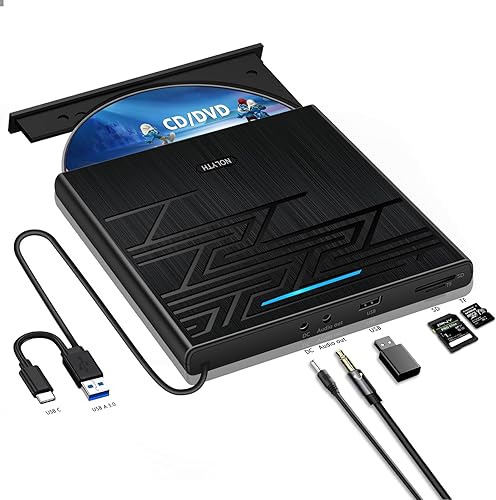
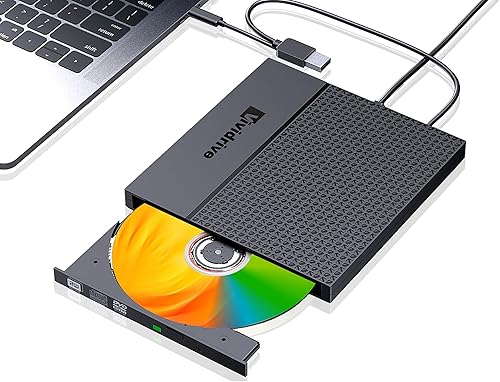
External DVD/CD Drive: This external DVD/CD drive can be used to play such as MP4, MKV, AVI, FLV, ASF, TS, VOB, etc. It supports DVD playback, CD playback, CD ripping, DVD ripping, Portable Design: The external DVD/CD drive is small and lightweight, making it easy to carry and use. It has a built-in USB, Our portable DVD player is not only a CD/DVD reader, but also a CD/DVD burner/burner, 4 port USB 3.0 hub, SD card reader, TF card reader (SD card and TF card are not used at the same time), Directly connect USB and Type-c to computer devices, extention three USB interface TF/SD card reader, which can meet various needs. The drive also has a type-c power supply interface, which is more convenient to use., High-Speed Transmission: The external DVD/CD drive has a high-speed transmission rate, which can greatly improve the reading and writing speed of DVD discs at a speed of up to 8X, and CD discs at a speed of up to 24X., 【Best Thing to Know Before Buying】①This USB disc drive is designed for use with Windows, Linux, and Mac PCs. It is not compatible with Chromebooks, mobile phones, iPhones, iPads, cars, projectors, TVs, or Blu-ray discs. ② To eject a disc on Mac computers, simply right-click on the desktop icon and select "eject," or choose "File" > "Eject" from the menu.
Beneficios clave de External CDDVD Drive for Laptop, 7 in 1 USB Ultra-Slim Portable CDDVD Player Burner, Slot Type CD ROM Burner External Disc reader Compatible with
- External DVD/CD Drive: This external DVD/CD drive can be used to play such as MP4, MKV, AVI, FLV, ASF, TS, VOB, etc. It supports DVD playback, CD playback, CD ripping, DVD ripping
- Directly connect USB and Type-c to computer devices
- extention three USB interface TF/SD card reader, which can meet various needs. The drive also has a type-c power supply interface, which is more convenient to use.
- High-Speed Transmission: The external DVD/CD drive has a high-speed transmission rate, which can greatly improve the reading and writing speed of DVD discs at a speed of up to 8X, and CD discs at a speed of up to 24X.
- External DVD/CD Drive: This external DVD/CD drive can be used to play such as MP4
- MKV
- AVI
- FLV
- ASF
- TS
- VOB
- etc. It supports DVD playback
- CD playback
- CD ripping
- DVD ripping
- Portable Design: The external DVD/CD drive is small and lightweight
- making it easy to carry and use. It has a built-in USB
- Our portable DVD player is not only a CD/DVD reader
- but also a CD/DVD burner/burner
- 4 port USB 3.0 hub
- SD card reader
- TF card reader (SD card and TF card are not used at the same time)
- extention three USB interface TF/SD card reader
- which can meet various needs. The drive also has a type-c power supply interface
- which is more convenient to use.
- High-Speed Transmission: The external DVD/CD drive has a high-speed transmission rate
- which can greatly improve the reading and writing speed of DVD discs at a speed of up to 8X
- and CD discs at a speed of up to 24X.
- 【Best Thing to Know Before Buying】①This USB disc drive is designed for use with Windows
- Linux
- and Mac PCs. It is not compatible with Chromebooks
- mobile phones
- iPhones
- iPads
- cars
- projectors
- TVs
- or Blu-ray discs. ② To eject a disc on Mac computers
- simply right-click on the desktop icon and select "eject
- " or choose "File" > "Eject" from the menu.
Ficha técnica
- SKU
- B0CTDFNQ2R
- Categorías
- Electrónica / Computadoras y Accesorios / Componentes Externos / Unidades de CD
- Compra segura y envío rápido a todo El Salvador
- Garantía Yaxa y soporte experto en tu External CDDVD Drive for Laptop, 7 in 1 USB Ultra-Slim Portable CDDVD Player Burner, Slot Type CD ROM Burner External Disc reader Compatible with
- Atención personalizada por WhatsApp y canales oficiales.